
问题来源
其实这个问题来源于写 Vue 表单时没有太注意的细节。<el-form> 是通过 :model 绑定,而 <el-input> 是通过 v-model 绑定。当时粗略看了下代码,但是已经很久了,并且没有形成记录,所以现在再看一次,并记录一下。
Vue Form 相关代码分析
这需要来看一下 Vue 中是怎么完成一个表单的。
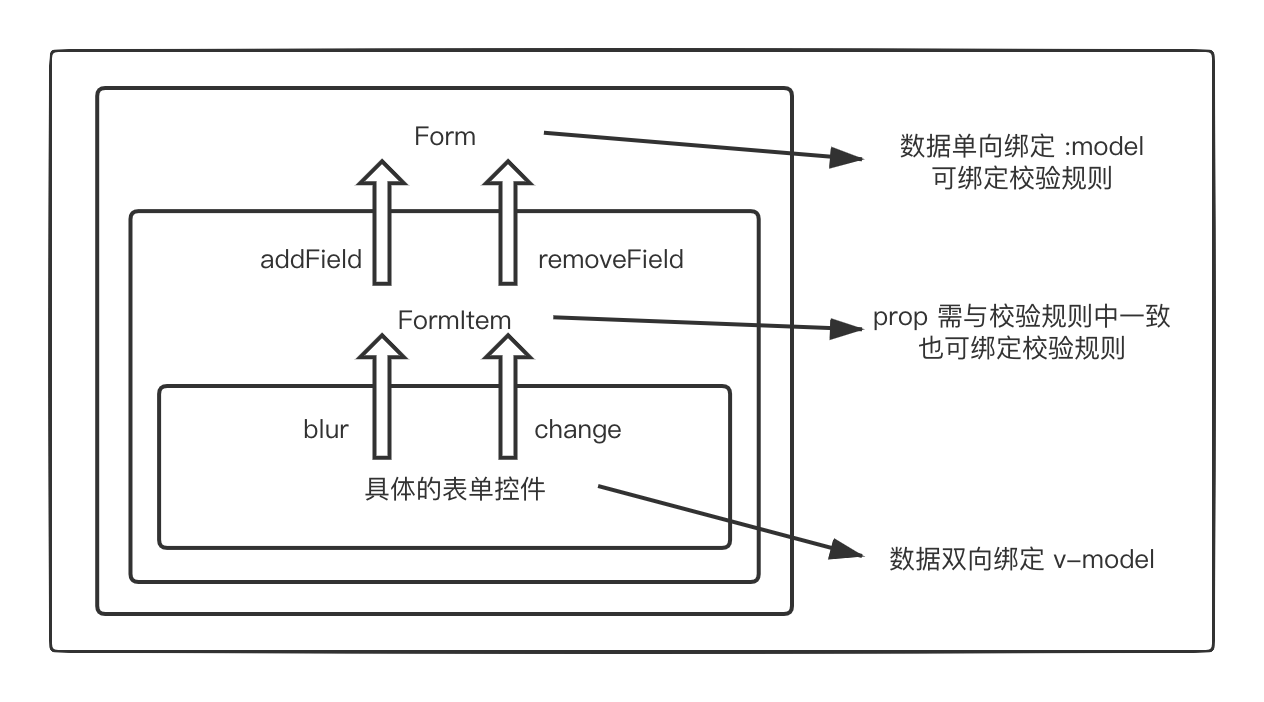
Input
具体的 Item 控件以 Input 为例来看看代码。
<template>
				<!-- ... -->
				<i class="el-input__icon"
          v-if="validateState"
          :class="['el-input__validateIcon', validateIcon]">
        </i>
				<!-- ... -->
</template>
<script>
	export default {
		inject: {
      elForm: {
        default: ''
      },
      elFormItem: {
        default: ''
      }
    },
		props: {
			value: [String, Number],
		},
		computed: {
      validateState() {
        return this.elFormItem ? this.elFormItem.validateState : '';
      },
      needStatusIcon() {
        return this.elForm ? this.elForm.statusIcon : false;
      },
    }
		methods: {
      // 响应输入
			handleInput(event) {
        // should not emit input during composition
        // see: https://github.com/ElemeFE/element/issues/10516
        if (this.isComposing) return;
        // hack for https://github.com/ElemeFE/element/issues/8548
        // should remove the following line when we don't support IE
        if (event.target.value === this.nativeInputValue) return;
        this.$emit('input', event.target.value);
        // ensure native input value is controlled
        // see: https://github.com/ElemeFE/element/issues/12850
        this.$nextTick(this.setNativeInputValue);
      },
      // 输入框尾部
      getSuffixVisible() {
        return ... || (this.validateState && this.needStatusIcon);
      }
		}
	}
</script>
可以看出,Input 组件主要做的就是处理真正的输入,并响应输入的改变。他不做数据的校验,只是根据父组件 FormItem 的校验状态 validateState 和父父组件 Form 的显示状态 statusIcon 来展示最终的校验状态而已(根据方法 getSuffixVisible)。而这一步,是通过依赖注入实现的。
除此之外,Input 组件会分别在改变和 blur 时向组件 FormItem 传播事件 el.form.change 和 el.form.blur,在后面的章节中,我们来看看这个事件具体是干嘛。
FormItem
让我们再来看看 FormItem 组件。
<script>
	export default {
		provide() {
      return {
        elFormItem: this
      };
    },
    data() {
      return {
        validateState: '',
        validateMessage: '',
        validateDisabled: false,
        validator: {},
        ...
      };
    },
		props: {
			prop: String,
		},
		computed: {
      // 获取父元素
      form() {
        let parent = this.$parent;
        let parentName = parent.$options.componentName;
        while (parentName !== 'ElForm') {
          if (parentName === 'ElFormItem') {
            this.isNested = true;
          }
          parent = parent.$parent;
          parentName = parent.$options.componentName;
        }
        return parent;
      },
      // 从父元素绑定的 model 中获取对应属性的值
      fieldValue() {
        const model = this.form.model;
        if (!model || !this.prop) { return; }
        let path = this.prop;
        if (path.indexOf(':') !== -1) {
          path = path.replace(/:/, '.');
        }
        return getPropByPath(model, path, true).v;
      },
    }
		methods: {
      // 校验本属性,trigger 为 blur、change 等
			validate(trigger, callback = noop) {
        this.validateDisabled = false;
        const rules = this.getFilteredRule(trigger);
        if ((!rules || rules.length === 0) && this.required === undefined) {
          callback();
          return true;
        }
        this.validateState = 'validating';
        const descriptor = {};
        // 匹配 AsyncValidator 插件所需要的格式,需要做规则数据做一些操作
        if (rules && rules.length > 0) {
          rules.forEach(rule => {
            delete rule.trigger;
          });
        }
        descriptor[this.prop] = rules;
        const validator = new AsyncValidator(descriptor);
        const model = {};
        model[this.prop] = this.fieldValue;
        validator.validate(model, { firstFields: true }, (errors, invalidFields) => {
          this.validateState = !errors ? 'success' : 'error';
          this.validateMessage = errors ? errors[0].message : '';
          callback(this.validateMessage, invalidFields);
          this.elForm && this.elForm.$emit('validate', this.prop, !errors, this.validateMessage || null);
        });
      },
      // 获取所有的校验规则
      getRules() {
        let formRules = this.form.rules;
        const selfRules = this.rules;
        const requiredRule = this.required !== undefined ? { required: !!this.required } : [];
        const prop = getPropByPath(formRules, this.prop || '');
        formRules = formRules ? (prop.o[this.prop || ''] || prop.v) : [];
        return [].concat(selfRules || formRules || []).concat(requiredRule);
      },
      // 添加监听
      addValidateEvents() {
        const rules = this.getRules();
        if (rules.length || this.required !== undefined) {
          this.$on('el.form.blur', this.onFieldBlur);
          this.$on('el.form.change', this.onFieldChange);
        }
      },
		},
    mounted() {
      if (this.prop) {
        this.dispatch('ElForm', 'el.form.addField', [this]);
        ...
        this.addValidateEvents();
      }
    },
	}
</script>
FormItem 与 Form 之间同样有交互,它有两种方式。
一是依赖注入,获取到最近的 Form 表单,传播了一个 validate 的事件。(不过我没有看到在哪里响应了这个事件。。。有看到同学欢迎告诉我~)
二是通过在计算属性中直接获取父元素计算 form 得到的最外层的 Form 组件(因为可能有嵌套),在具体使用到父元素 form 的地方主要有以下两点。
-
获取对应属性的值:通过观察
fieldValue方法,我们可以知道,FormItem 是通过父元素 Form 绑定的model和自身props中的prop间接获取对应值的(通过 util 方法getPropByPath计算对象model中的一个路径为prop的属性的值,可参考代码)。 -
获取所有的校验规则:通过观察
getRules方法,在 FormItem 组件中会获取整个 Form 中与自己相关的规则,但是通过自身传入的规则优先级更高,会覆盖整个 Form 中关于自身的规则。(根据代码selfRules || formRules || [])
此外,FormItem 做的最重要的一件事就是对当前 Item 的验证。在 validate 方法中,会根据 trigger 的不同获取相应 trigger 的规则,然后通过 AsyncValidator 进行校验,set 当前的validateState (正如之前所说,具体的 Item 控件会获取此值)并进行回调。
再让我们来看看 FormItem 是怎么响应 Input 组件传播过来的事件的。在 FormItem 挂载时,调用了 addValidateEvents 方法,他监听了 el.form.change 和 el.form.blur 这两个事件,在具体的事件处理函数中,调用了 validate 方法,即对当前值立刻进行了验证。
还需要注意的一点是,在 FormItem 挂载的钩子中,它传播了一个事件 el.form.addField 给父组件 Form,参数为当前组件。我们待会儿再来看它具体做了什么。
Form
最后,我们再来看看 Form 组件。
<script>
	export default {
		provide() {
      return {
        elForm: this
      };
    },
    created() {
      // 初始化时
      this.$on('el.form.addField', (field) => {
        if (field) {
          this.fields.push(field);
        }
      });
      ...
    },
		methods: {
			validate(callback) {
        if (!this.model) {
          console.warn('[Element Warn][Form]model is required for validate to work!');
          return;
        }
        let promise;
        // if no callback, return promise
        if (typeof callback !== 'function' && window.Promise) {
          promise = new window.Promise((resolve, reject) => {
            callback = function(valid) {
              valid ? resolve(valid) : reject(valid);
            };
          });
        }
        let valid = true;
        let count = 0;
        // 如果需要验证的fields为空,调用验证时立刻返回callback
        if (this.fields.length === 0 && callback) {
          callback(true);
        }
        let invalidFields = {};
        this.fields.forEach(field => {
          field.validate('', (message, field) => {
            if (message) {
              valid = false;
            }
            invalidFields = objectAssign({}, invalidFields, field);
            if (typeof callback === 'function' && ++count === this.fields.length) {
              callback(valid, invalidFields);
            }
          });
        });
        if (promise) {
          return promise;
        }
      },
      validateField(props, cb) {
        props = [].concat(props);
        const fields = this.fields.filter(field => props.indexOf(field.prop) !== -1);
        if (!fields.length) {
          console.warn('[Element Warn]please pass correct props!');
          return;
        }
        fields.forEach(field => {
          field.validate('', cb);
        });
      },
		}
	}
</script>
我们首先来看看 Form 的 created 生命周期钩子,它监听了事件 el.form.addField,并将参数 push 进了当前的 fields 数组以完成 fields 的初始化,所以 fields 中实际存的就是当前表单的所有 FormItem。
最后,我们来回想一下用户进行表单验证时是怎么调用的。用户验证表单时不是单个单个对 FormItem 而是对整个 Form 的,所以在验证时,无论是调用 validate 还是 validateField,会遍历所有相关 field 即 FormItem,并通过子组件 FormItem 依次进行验证。
总结
相信到现在,Form、FormItem、具体的表单控件如 Input 这三者之间的关系已经很清楚了。
- 具体的表单控件:处理数据变化。
- 双向绑定了操作的对象;
- 传递
blur和change事件以期望进行立刻的校验; - 它获取父组件等是通过依赖注入。
- FormItem:通过规则校验数据。
- 在挂载时通过事件
addField告知父组件; - 响应
blur和change事件以进行真正的校验; - 它不主动与子组件交互,但会直接获取父元素,并通过计算拿到父元素单向绑定的对象中特定属性的值,即需要校验的值,从而让校验可以进行;
- 用自身的规则(如果存在)覆盖父组件 Form 中的规则。
- 在挂载时通过事件
- Form:提供表单整体验证的功能。
- 响应
addField事件以记录当前表单的 FormItem; validate等被调用时实际是通过FormItem.validate实现的。
- 响应